
The safest way to use GameBanana with Dusklight is to treat each page as a third-party community source that must be checked before installation. The official application baseline verified for this guide is Dusklight v1.4.1, published June 16, 2026. GameBanana collections and individual mod pages can change independently, so a community upload should never be treated as an official release or as a permanent compatibility promise.
This guide explains how to find a relevant Dusklight skin or texture pack, check its author and supported release, back up saves and settings, install one change at a time, and roll back without deleting working data. Dusklight Wiki does not mirror GameBanana archives, host ROMs, or redistribute Nintendo game assets.
If you are looking for general texture replacement and recovery advice, start with the existing mods and texture packs guide. This page has a narrower boundary: it covers the GameBanana source, community-pack checks, and the evidence you should keep before adding a file to a clean setup.
- Official app baseline
- Dusklight v1.4.1 · June 16, 2026
- Community source
- GameBanana (third-party)
- Before install
- Back up saves and settings
- Game data
- User-supplied supported GameCube dump
- Download policy
- No mirrored packs or ROMs
- Recovery
- Clean folder + one change at a time
Find the right GameBanana source page
A search for Dusklight mods can surface collections, individual uploads, texture categories, and pages that are actually about another Twilight Princess workflow. Start with the relevant GameBanana collection or category, then confirm that the page names Dusklight or the matching Twilight Princess PC project rather than a generic emulator pack.
Keep the source URL, author name, page date, supported release, and installation notes together. A useful mod page tells you what it changes, where its files belong, whether it replaces existing assets, and how to remove it. If the archive has no author, no scope, no license or permission note, and no recovery instructions, it is not a good first test even when the filename looks familiar.
The official TwilitRealm release remains the application source. GameBanana is useful for community discovery, but a collection page is not proof that every item in it is compatible with the current Dusklight release. Check each item instead of assuming the collection has one shared version boundary.
- Start from the current releaseRecord Dusklight v1.4.1, platform, architecture, and graphics backend before testing a pack.
- Open a relevant collection or categoryConfirm that the page is for Dusklight or the matching Twilight Princess project.
- Read the individual mod pageCheck author, scope, supported version, license, file contents, and removal steps.
- Save the evidenceKeep the source URL and archive separate from the active installation folder.
Check a GameBanana mod before downloading
Do not judge a community pack only by its thumbnail or by a comment that says it works. A skin can replace a character texture, a larger texture pack can affect many areas, and a settings file can alter behavior without looking like a traditional mod. The risk comes from the file scope and the installation instructions, not just from the visual result.
Use the table below as a quick stop-or-go check. A missing field does not prove that a pack is malicious, but it does mean that you lack the information needed for a controlled installation. Prefer a documented pack or ask the author for the missing compatibility detail rather than guessing the path.
| Check | What to verify | Skip or pause when |
|---|---|---|
| Author and history | Named creator, useful description, comments or update notes | The archive is anonymous or the page has no meaningful scope |
| Target and release | Dusklight/Twilight Princess target and supported application version | It only says Dolphin, Dusk, or an old release without explanation |
| File scope | Exact folders, file types, and whether existing files are replaced | The instructions say to overwrite unknown folders |
| License and credits | Permission, credit, and any restrictions on redistribution | The pack claims to include commercial game data |
| Rollback | Removal steps or a clean way to restore the original state | There is no documented way back |
Install one GameBanana pack against a clean Dusklight baseline
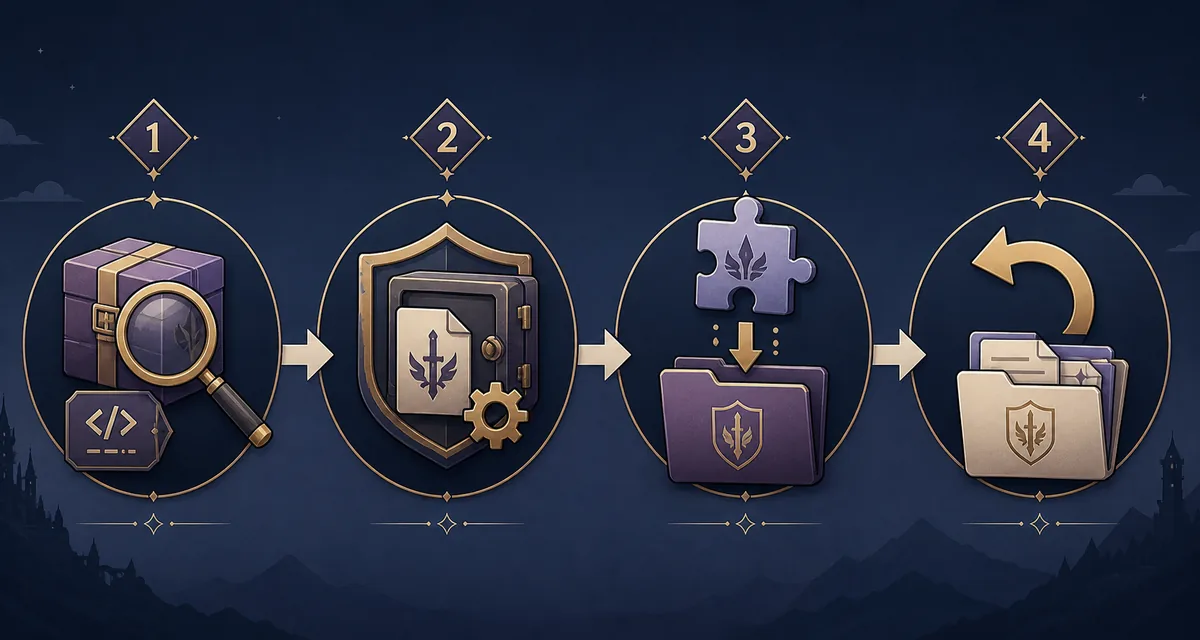
Before changing files, close Dusklight and copy the complete user-data folder that contains your saves and settings. Keep the backup outside the active installation and give it a date or version label. The exact save path varies by platform, so use the save-file guide when you are unsure; do not assume that saves sit beside the executable.
Download the community archive to a separate staging folder. Inspect its contents before copying anything. Follow the author's documented path, but do not overwrite the only clean copy of the official application. If the pack needs a particular texture-replacement folder or configuration file, copy only that documented scope and record what changed.
Launch a repeatable scene and check menus, the affected character or texture, saving, loading, and basic input. If the pack is a skin mod, verify the intended model or outfit without treating one successful screen as proof that every area works. A clean v1.4.1 folder and one tested pack give you a reliable comparison when the next change behaves differently.
- Close and back upExit Dusklight and copy saves, settings, and the clean folder before touching mod files.
- Record the baselineNote v1.4.1, platform, backend, game-data region, and the scene you will test.
- Stage the archiveKeep the downloaded file outside the active folder and inspect its documented contents.
- Copy one changeInstall only the files the author describes; do not combine several packs in the first test.
- Test and note the resultCheck the intended visual change, menus, saving, loading, and performance before adding anything else.
Roll back a broken skin or texture mod
If Dusklight crashes, shows missing interface textures, fails to load the intended skin, or becomes slower after the change, do not start by deleting saves or replacing the game dump. Close the application, preserve the current folder for comparison, and move the suspected community files out of the active path. Then test the clean v1.4.1 setup with the same user-owned game data.
When the clean copy works, restore the backup or create a separate mod test folder. If several packs were added, remove them as a group and reintroduce one at a time. This binary-search approach is faster than guessing and prevents an old texture cache or duplicate file from being mistaken for a release bug. Report a reproducible clean-release problem to the official project only after the community files are no longer part of the test.
- Keep the broken setup long enough to record the pack, release, backend, and exact symptom.
- Move community files out instead of deleting the only copy immediately.
- Compare a clean v1.4.1 folder with the same verified game data.
- Restore saves and settings from the dated backup only after the clean launch is confirmed.
- Re-add one pack or one settings group at a time and keep the source URL with your notes.
Dusklight GameBanana FAQ
Is GameBanana an official Dusklight source?
No. GameBanana is a third-party community platform. Use the official TwilitRealm website and GitHub release for the Dusklight application, then evaluate any GameBanana pack separately.
Can I use a GameBanana skin mod with Dusklight?
Possibly, when the individual page clearly identifies the target project, supported release, file scope, and installation method. Treat the pack as community software, back up your data, and test it alone against a clean v1.4.1 baseline.
Does Dusklight include GameBanana mods?
No. The official application and community packs are separate. A normal Dusklight release does not include anonymous texture archives or a bundled collection of user modifications.
Should I download a ROM from a GameBanana page for Dusklight?
No. This site does not link to ROM or copyrighted game-data downloads. Follow the official workflow with a supported GameCube dump created from your own copy, and keep that data separate from application and mod files.
Why did Dusklight crash after I installed a texture or skin pack?
The pack may target another release, replace a wider file set than expected, conflict with another pack, or be installed in the wrong path. Move the community files aside, test clean v1.4.1, and reintroduce one documented change at a time.
How do I install an Ordon outfit skin?
Use the specific GameBanana mod page's instructions rather than a universal path. Check the target release and file scope, back up saves and settings, stage the archive, install one change, and verify the intended character or outfit in a repeatable scene.
Sources checked August 10, 2026: official TwilitRealm website, official v1.4.1 GitHub release, GameBanana Dusklight mods collection, GameBanana Dusklight texture category.